By Geethika Reddy ·
MP SI 2026 Exam Date: Find Your Shift and Centre on the Admit Card
The MPESB admit-card page for Subedar and Sub-Inspector recruitment is available. Use your application details to check your own examination arrangements.

MPESB has made the admit-card page available for the Subedar and Sub-Inspector Recruitment Test 2026. If you are searching for your MP SI exam date, use the official admit-card page to check the examination arrangements allotted to you. A general recruitment date does not replace your own admit card.
Keep these three details ready
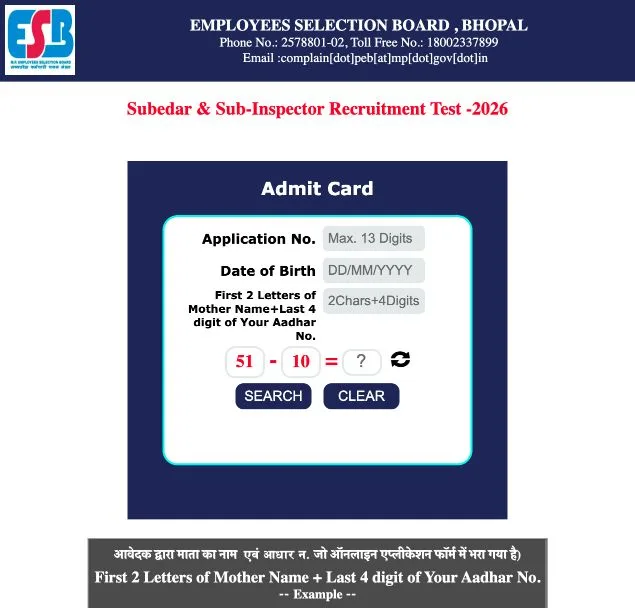
The form asks for your application number, date of birth and a verification code based on the details entered in your application. The application-number field accepts up to 13 digits. Enter the date of birth in DD/MM/YYYY format.
For the verification code, combine the first two letters of your mother's name with the last four digits of your Aadhaar number, following the name recorded in the application. The portal gives examples below the form, including names entered with initials or a title. Read those examples if your saved name begins differently from the name you normally use.
Check the card before planning your journey
- Open the official form and confirm that its heading says Subedar & Sub-Inspector Recruitment Test 2026.
- Enter your own application details and complete the security check displayed on the page.
- Use Search to retrieve the available admit-card information. Read the allotted date, shift, reporting instructions and examination-centre address carefully.
- Save the card and prepare the printout and documents required by its instructions. Check the route to the exact centre rather than relying only on the city name.
Keep the card private: it may contain identifiers that should not be posted in a public comment or shared with an unofficial download service.
If your details do not retrieve a card
Compare your entries with the saved application first. Check the date format and the two-character name prefix before retrying. Do not use another candidate's details to test the form.
If the issue continues, use the contact route on the MPESB website. Describe the error and the recruitment test clearly. Follow subsequent official notices if they change an arrangement shown earlier.
Our MP SI recruitment schedule article provides background on the cycle. Use the admit card and the latest MPESB instructions for your individual examination arrangements.